 Basecamp
$19
or $190/yearly 2 months free
- Dependencies & auto-scheduling
- Critical path, milestones & baselines
- Progress tracking
- Customizable columns
- Synced with your Basecamp projects
Simple, yet powerful Gantt charts for your Basecamp projects.
Turn your Basecamp to-dos into a visual project timeline.
Plan dates, dependencies, and milestones—all synced with Basecamp.
$19/month or $190/year · 14-day free trial · No credit card required
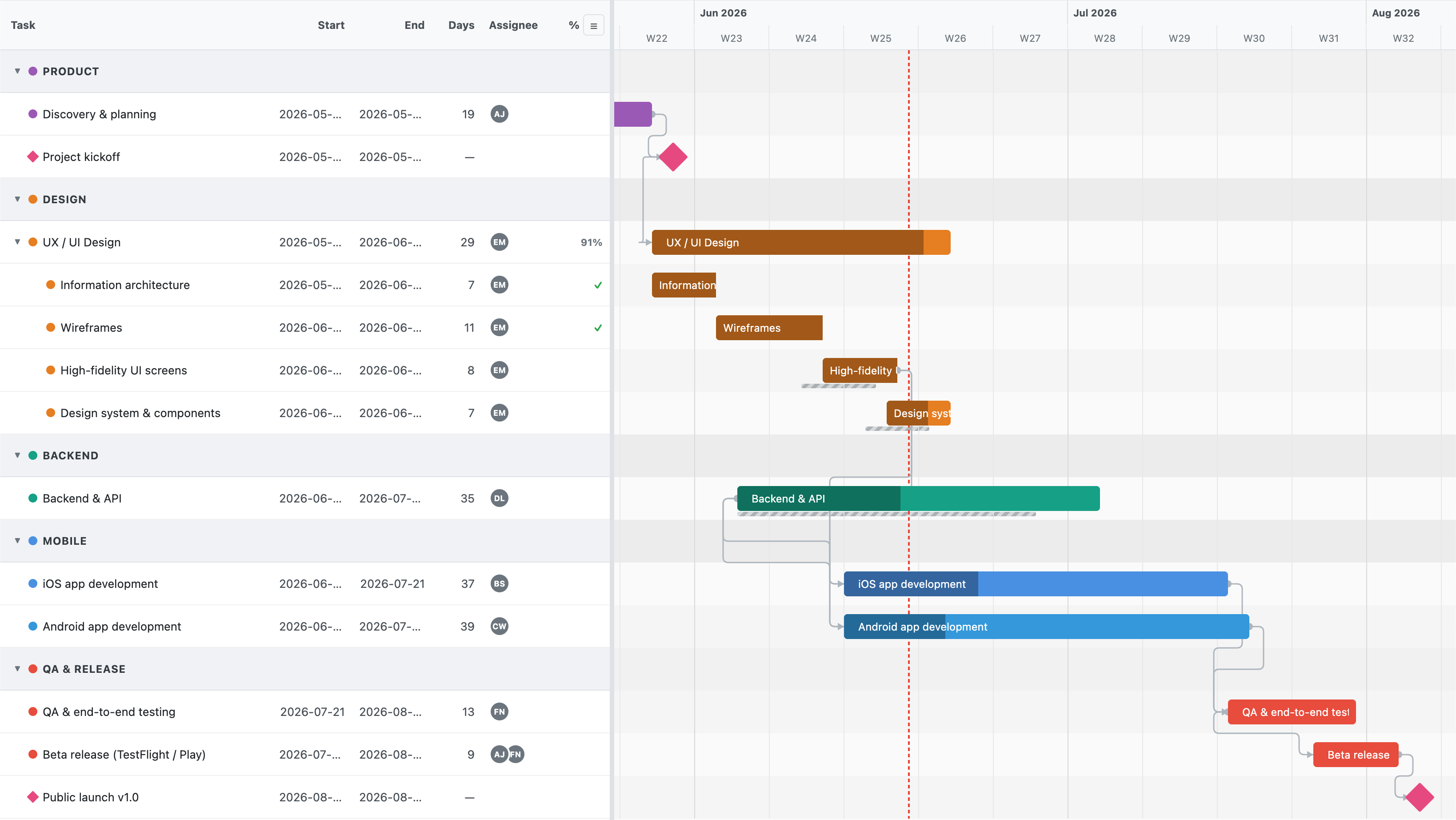
Why Le Gantt
Le Gantt brings full project-planning power to Basecamp—not just a timeline.
Move one task and every dependent date shifts forward automatically.
Drag a handle on each bar to show how far along the work is.
Highlight the chain of tasks that actually drives your deadline.
Turn any task into a milestone to mark the dates that matter.
Skip weekends and holidays so tasks never start or finish on a day off.
Select several bars and drag them together—dependent tasks move right along with them.
Freeze the plan and compare it against where things really stand.
Reorder, resize, and hide dates, assignees, and progress to taste.
Assign people to any task or subtask, then check it off as the work gets done.
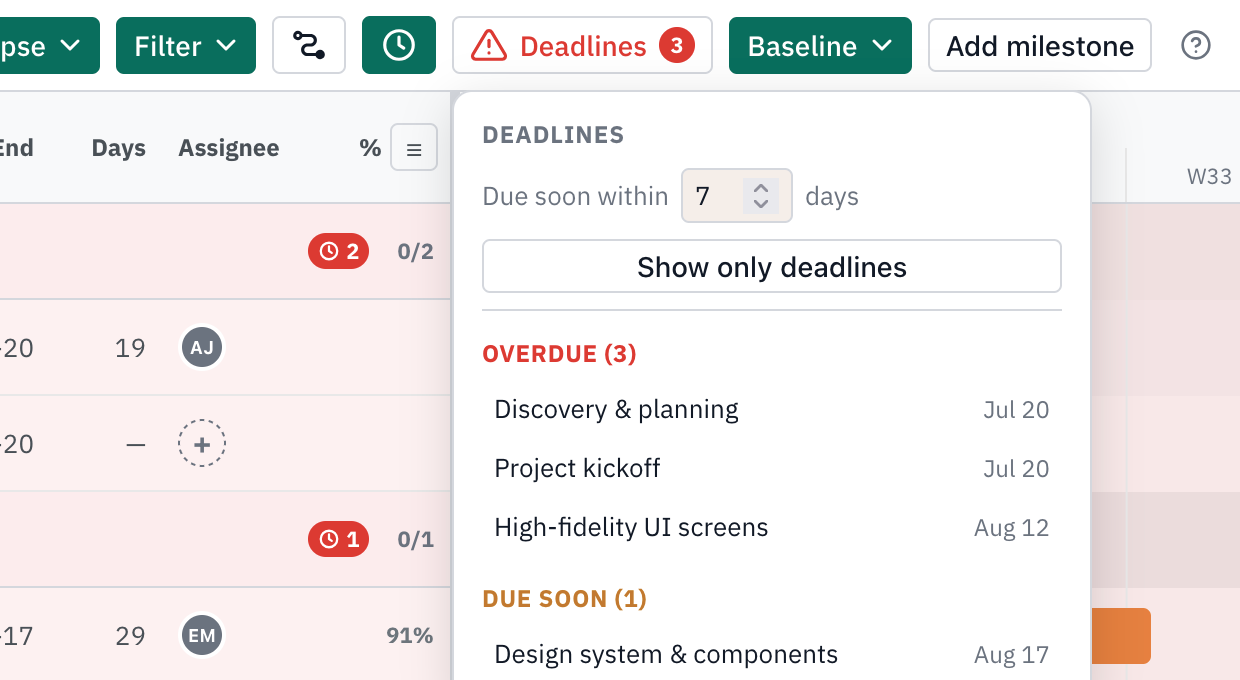
Spot slipping work at a glance—overdue tasks turn red, due-soon ones amber, with a list that rounds them all up.
Pin a task to a hard date—must start on, or start no earlier than—and auto-scheduling works around it instead of shoving it aside.
Give every subtask its own start and due dates and see it as a bar under its parent task.
How it works
From linking tasks to tracking progress—here's what planning in Le Gantt looks like.
Drag the handle on a task and drop the arrow onto another to link them. Le Gantt auto-schedules forward, so moving a predecessor cascades every dependent date down the chain. Click any connection to set its type and lag.
Need to adjust plans? Just double-click a dependency arrow to remove it.
Drag a bar's edges to change its duration, or move the whole bar to reschedule it—no leaving the chart. Dates sync straight back to your tasks, and you can right-click any bar to turn it into a milestone.
Turn on working-time scheduling and Le Gantt skips weekends and the holidays you define—tasks never start or finish on a day off, and bars stretch across the greyed-out days. Set your own weekend (Israel works Sunday) and a named holiday list, and every drag, resize, and dependency cascade lands on a working day.
Hold ⌘ (Cmd) on Mac or Ctrl on Windows and click to select several bars, then drag any one of them—every selected task moves by the same number of days, and their dependencies come along automatically. Click an empty spot on the timeline to clear the selection.
Click any connection to pick its type: Finish→Start (the default—the successor starts after the predecessor finishes), Start→Start, Finish→Finish, or Start→Finish. Add lag or lead time in days to build in gaps or overlaps, and Le Gantt auto-schedules forward to respect every type.
Drag the progress handle on any bar to mark how far along it is, then capture a baseline to freeze the plan. Le Gantt overlays a planned-vs-actual ghost so you can see exactly where the project drifted.
Le Gantt highlights the critical path—the connected chain of tasks where any slip pushes your finish date. Everything off the path has slack; everything on it needs your attention. Flip it on to know exactly where to focus.
Right-click any task to turn it into a milestone—a diamond that pins a key date on the timeline. Use them for launches, reviews, and hand-offs so the whole team can see the deadlines that count at a glance.
Capture a baseline to snapshot your schedule as promised. As dates shift, Le Gantt overlays a planned-vs-actual ghost bar so you can see exactly where and when the project drifted—and by how much.
Reorder, resize, or hide the columns beside your chart—name, dates, assignee, progress. Show only what your team needs and drag them into the order that fits how you read a plan.
Give every task and subtask an owner, then mark it complete right on the timeline.
Le Gantt flags every task and milestone that's overdue in red and due soon in amber, right on the chart and in the sidebar. Open the deadlines list to see them split into Overdue and Due soon, and click any one to jump straight to it. Set your own due-soon window—7 days by default—or flip on “only deadlines” to hide everything that's on track.
Right-click a bar and open the constraint editor: pick a type—must start on, start no earlier than, must finish on, finish no earlier than—and a date. A must-on date anchors the task so auto-scheduling never moves it, even when a dependency pushes; a no-earlier-than date sets a floor it can still slide past. A pin on the bar marks the constrained date.
Every subtask gets its own Start on and Due on dates—drag or resize its bar and it sits right under its parent.
Le Gantt comes in both a bright light theme and an easy-on-the-eyes dark theme. Pick whichever suits your workspace and the whole chart, sidebar, and controls follow along—comfortable to read day or night.
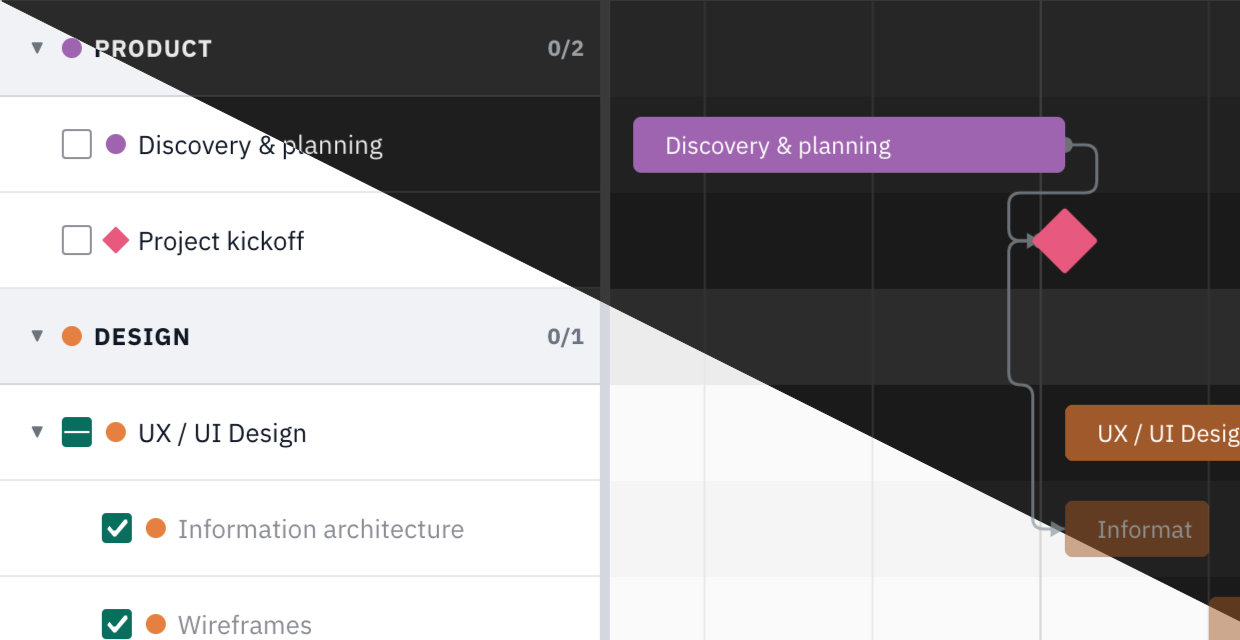
Your to-do lists and to-dos come straight from Basecamp, and date changes write back automatically. Reorder, resize, or hide the sidebar columns—name, dates, assignee, progress—to fit how your team works.
Pricing
Every feature included. Start with a 14-day free trial—no credit card required.
$19/month or $190/year (two months free)—with a 14-day free trial and no credit card required to start. The subscription keeps your charts in sync with Basecamp.
No. Your todo lists and todos stay in Basecamp and remain the source of truth. Date changes you make on the chart write back to the matching Basecamp todos, while chart-only extras like progress and baselines are stored securely on our side.
Le Gantt synchronizes some data with Basecamp—specifically the start and due dates of your to-dos. When you set or adjust a date on the chart, it's saved back to the matching Basecamp to-do. Everything else (dependencies, progress, milestones, baselines, and the critical path) is chart-only and stored on our side, so it never alters your Basecamp content.
Open your project in Basecamp, then ••• → Set up tools → Open a Door, and paste your Le Gantt project link. The Gantt chart then lives right inside your project navigation.
Turn your to-dos into a living Gantt chart in minutes. 14-day free trial, no credit card required.