
Why Le Gantt
Real project planning, right where you work
The same powerful timeline tools, tailored to each platform.
-
Auto-scheduling
Move one task and every dependent date shifts forward automatically.
-
Progress tracking
Drag a handle on each bar to show how far along the work is.
-
Critical path
Highlight the chain of tasks that actually drives your deadline.
-
Milestones
Turn any task into a milestone to mark the dates that matter.
Pro
Do more with Pro
Le Gantt for Trello is free. These Pro features are part of an optional Pro subscription—unlock them right inside the Power-Up, with more paid features on the way.
-
Weekends & holidays Pro
Skip weekends and holidays so tasks never start or finish on a day off.
-
Bulk move Pro
Select several bars and drag them together—dependent tasks move right along with them.
-
Baselines Pro
Freeze the plan and compare it against where things really stand.
-
Custom columns Pro
Reorder, resize, and hide dates, assignees, and progress to taste.
-
Assignees & completion Pro
Assign people to any task or subtask, then check it off as the work gets done.
-
Overdue & due-soon alerts Pro
Spot slipping work at a glance—overdue tasks turn red, due-soon ones amber, with a list that rounds them all up.
-
Date constraints Pro
Pin a task to a hard date—must start on, or start no earlier than—and auto-scheduling works around it instead of shoving it aside.
-
Subtask start & due dates Pro
Give every subtask its own start and due dates and see it as a bar under its parent task.
$19/month or $190/year—two months free. No trial: every other feature stays free. Upgrade from the Upgrade to Pro button inside the Power-Up.
How it works
Plan your board on a timeline
Link cards, reschedule by dragging, and keep everything inside Trello.
-
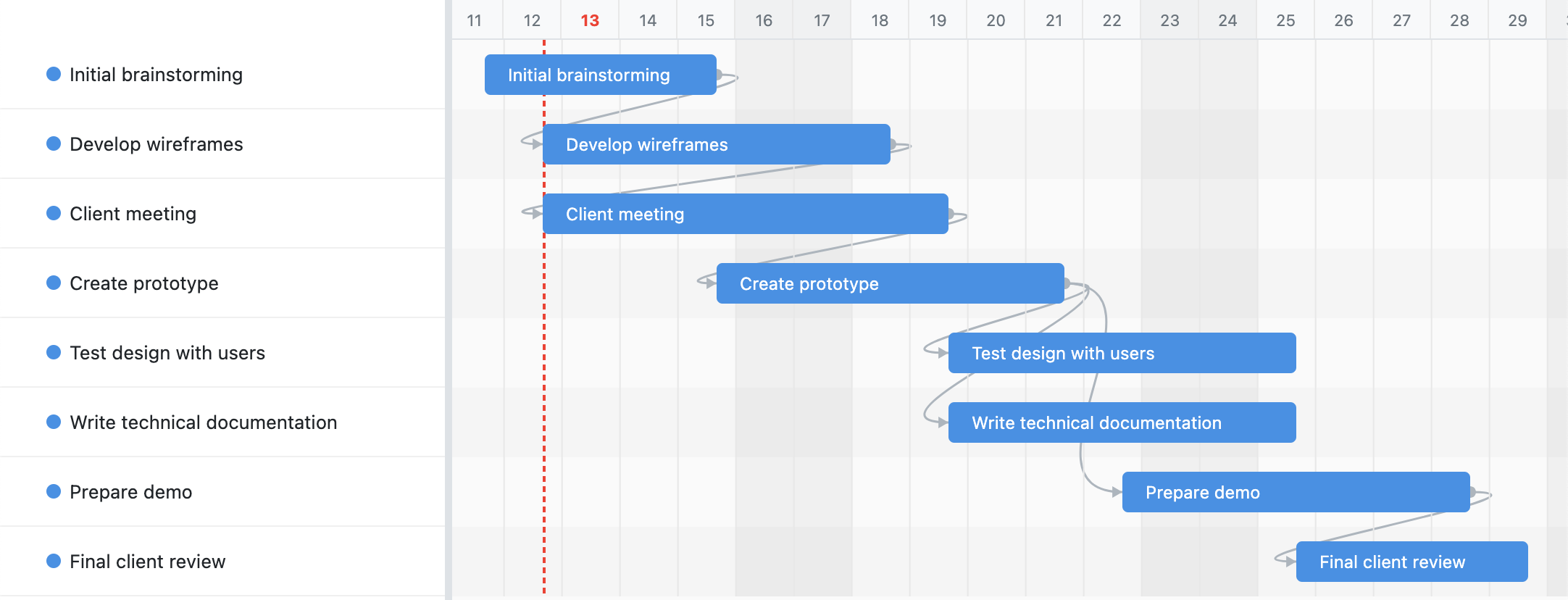
Dependencies that reschedule for you
Drag the handle on a task and drop the arrow onto another to link them. Le Gantt auto-schedules forward, so moving a predecessor cascades every dependent date down the chain. Click any connection to set its type and lag.
-
Remove connections in one step
Need to adjust plans? Just double-click a dependency arrow to remove it.
-
Plan dates right on the timeline
Drag a bar's edges to change its duration, or move the whole bar to reschedule it—no leaving the chart. Dates sync straight back to your tasks, and you can right-click any bar to turn it into a milestone.
-
Schedule around weekends and holidays Pro
Turn on working-time scheduling and Le Gantt skips weekends and the holidays you define—tasks never start or finish on a day off, and bars stretch across the greyed-out days. Set your own weekend (Israel works Sunday) and a named holiday list, and every drag, resize, and dependency cascade lands on a working day.
-
Move a whole cluster at once Pro
Hold ⌘ (Cmd) on Mac or Ctrl on Windows and click to select several bars, then drag any one of them—every selected task moves by the same number of days, and their dependencies come along automatically. Click an empty spot on the timeline to clear the selection.
-
Four ways to connect your tasks
Click any connection to pick its type: Finish→Start (the default—the successor starts after the predecessor finishes), Start→Start, Finish→Finish, or Start→Finish. Add lag or lead time in days to build in gaps or overlaps, and Le Gantt auto-schedules forward to respect every type.
-
Track progress and compare to plan
Drag the progress handle on any bar to mark how far along it is, then capture a baseline to freeze the plan. Le Gantt overlays a planned-vs-actual ghost so you can see exactly where the project drifted.
-
See what actually drives your deadline
Le Gantt highlights the critical path—the connected chain of tasks where any slip pushes your finish date. Everything off the path has slack; everything on it needs your attention. Flip it on to know exactly where to focus.
-
Mark the dates that matter
Right-click any task to turn it into a milestone—a diamond that pins a key date on the timeline. Use them for launches, reviews, and hand-offs so the whole team can see the deadlines that count at a glance.
-
Freeze the plan, then watch reality Pro
Capture a baseline to snapshot your schedule as promised. As dates shift, Le Gantt overlays a planned-vs-actual ghost bar so you can see exactly where and when the project drifted—and by how much.
-
Make the sidebar work your way Pro
Reorder, resize, or hide the columns beside your chart—name, dates, assignee, progress. Show only what your team needs and drag them into the order that fits how you read a plan.
-
Assign work and check it off Pro
Give every task and subtask an owner, then mark it complete right on the timeline.
-
Catch slipping deadlines before they slip Pro
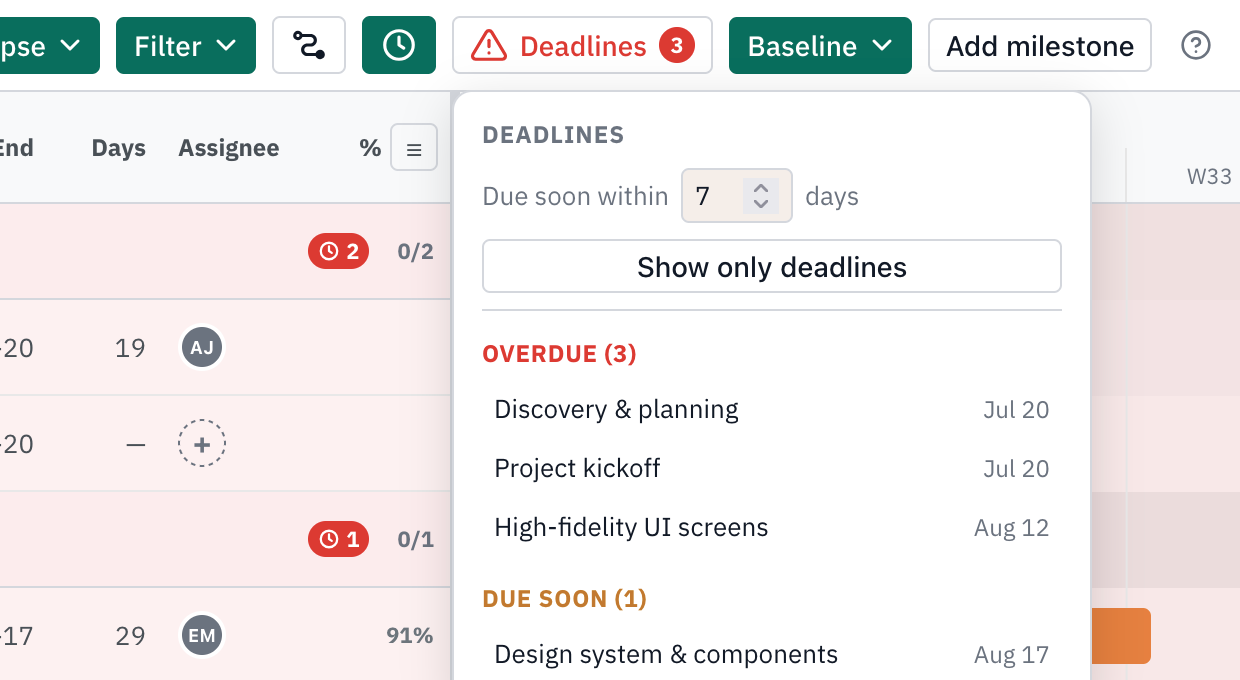
Le Gantt flags every task and milestone that's overdue in red and due soon in amber, right on the chart and in the sidebar. Open the deadlines list to see them split into Overdue and Due soon, and click any one to jump straight to it. Set your own due-soon window—7 days by default—or flip on “only deadlines” to hide everything that's on track.
-
Lock a task to a fixed date Pro
Right-click a bar and open the constraint editor: pick a type—must start on, start no earlier than, must finish on, finish no earlier than—and a date. A must-on date anchors the task so auto-scheduling never moves it, even when a dependency pushes; a no-earlier-than date sets a floor it can still slide past. A pin on the bar marks the constrained date.
-
Schedule subtasks on their own dates Pro
Every subtask gets its own Start on and Due on dates—drag or resize its bar and it sits right under its parent.
-
Work in light or dark
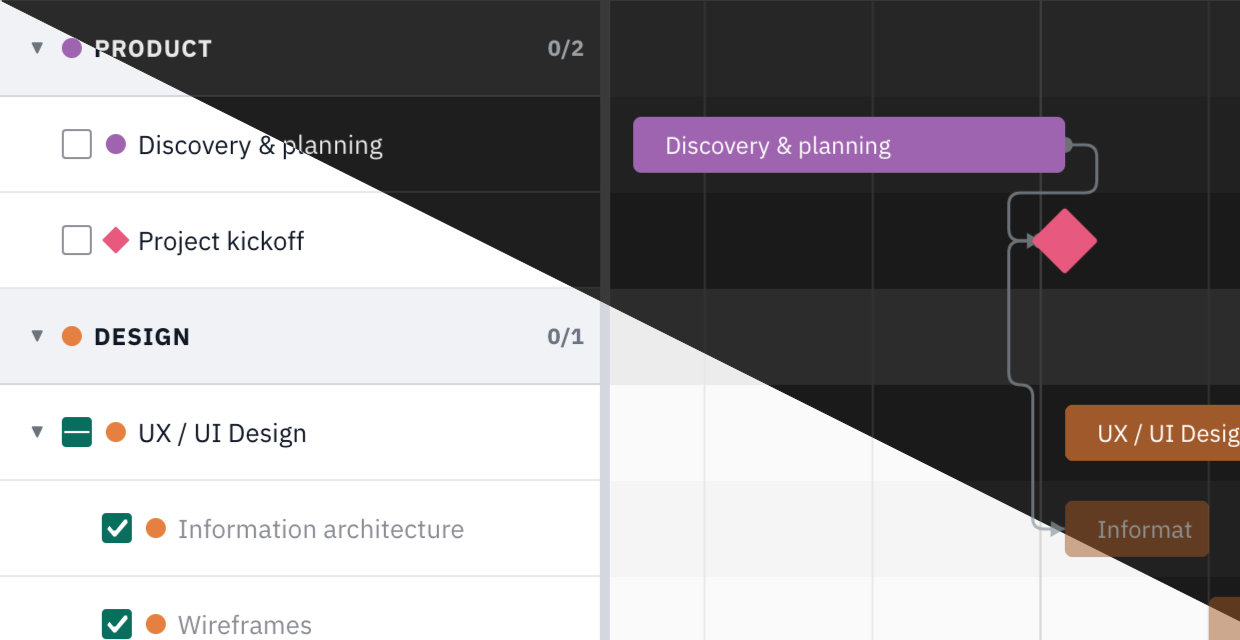
Le Gantt comes in both a bright light theme and an easy-on-the-eyes dark theme. Pick whichever suits your workspace and the whole chart, sidebar, and controls follow along—comfortable to read day or night.
-
100% Trello-native data
Everything is stored directly in Trello card properties—no external databases, no custom fields, no account or registration needed. Your data stays securely within your Trello workspace.
Frequently asked questions
Is Le Gantt free to use?
Yes—Le Gantt is free to use, and everything you need to build and schedule your Gantt chart is included. Several Pro features, such as baselines and task columns, are part of an optional subscription ($19/month or $190/year); there's no trial, and every other feature stays free.
Data transparency you can trust
We only store anonymized organization and user identifiers for analytics—nothing tied to your real names, board content, or card data. We believe in full transparency about the minimal information we collect.